ShopDreamUp AI ArtDreamUp
Deviation Actions






Description
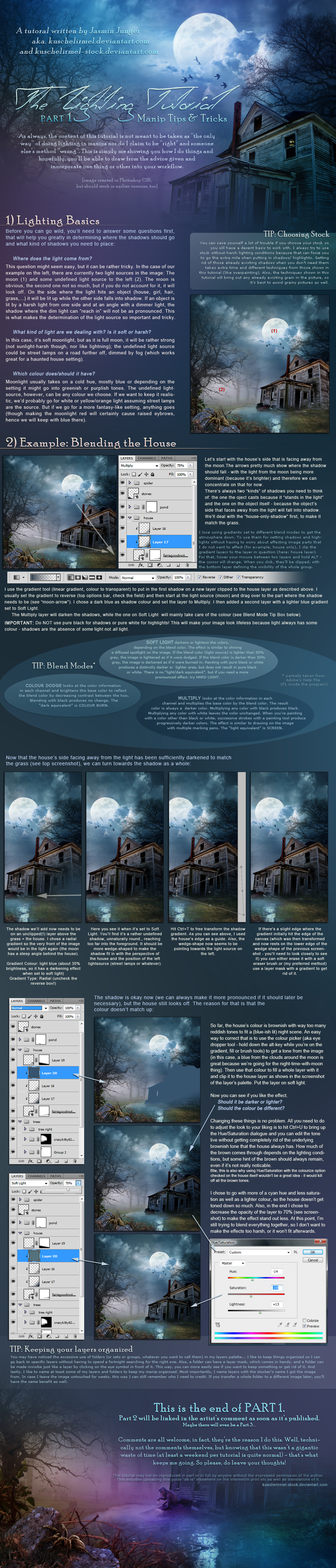
Soooooo, here it finally is: The Lighting Tutorial, Part 1 
Part 2 can be found here.
 In any case, I'd appreciate it if you'd let me see what you've created - I'm curious like that.
Comments & Feedback always welcome 
 NO REDISTRIBUTION, NO TRANSLATIONS
Part 2 can be found here.
About the tutorial:
I have no idea how comprehensive this is - it sure was hard to write, harder than my previous tuts. Lighting is such a complex thing and much of what I do is by gut instinct. It was hard to get this gut-feeling-thing written out in a somewhat coherent fashion
Part 1 deals with the basics, like what should your manip look like before you start, which stock is the most suitable and which questions you should answer before you even start. It shows you how you can add the bigger shadows using gradients and how you can adjust an object's colour to better fit with its environment in a very quick-and-easy way.
Part 2 [link] covers overall lighting and colourizing before showing a different method of setting highlights and shadows than "just painting them in" thus giving you a starting point so you don't have to paint in everything from scratch. Also, it touches on how to get those "really glowy" highlights.
 In any case, I'd appreciate it if you'd let me see what you've created - I'm curious like that. Comments & Feedback always welcome NO REDISTRIBUTION, NO TRANSLATIONS
R E L A T E Dt u t o r i a l s
More Tutorials
R E L A T E Da r t w o r k


Image size
950x4438px 3.38 MB
© 2010 - 2024 kuschelirmel-stock
Comments134
Join the community to add your comment. Already a deviant? Log In
This is exactly what I was looking for! I am just a learner, and I do Photoshop just for a hobby